

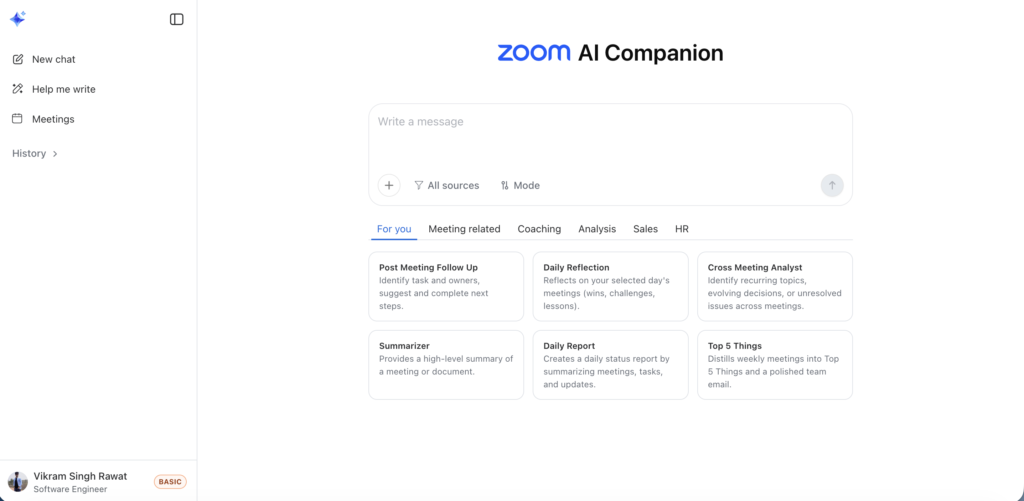
Zoom has made a significant move in the artificial intelligence space by launching its AI Companion 3.0, bringing powerful AI capabilities directly to the web and opening access to free-tier users for the first time. This strategic expansion marks a pivotal moment in Zoom’s evolution from a video conferencing platform to a comprehensive AI-powered productivity suite.
What’s New with Zoom AI Companion 3.0?
Web-Based Access for Everyone
The most notable change in this update is the availability of Zoom’s AI assistant through a web interface, making it accessible without needing to download the desktop application. This web-based approach aligns with modern work trends where flexibility and quick access are paramount.
Free Users Finally Get AI Features (With Limits)
For the first time, Zoom is extending AI capabilities to its basic plan users, though with reasonable limitations:
- Access to AI companion features in three meetings per month
- Meeting summaries automatically generated after calls
- In-meeting questions to help participants catch up quickly
- AI note-taking capabilities during sessions
- 20 questions per month through the side panel and web interface
Users on the free plan can also opt for a $10 monthly add-on to unlock additional AI companion features if they need more comprehensive access.
Powerful New Features in AI Companion 3.0
Integration with Third-Party Services
Zoom’s AI assistant now goes beyond just meeting data. The platform can retrieve information from:
- Google Drive
- Microsoft OneDrive
- All data stored within Zoom’s ecosystem
Coming soon, Zoom will add support for Gmail and Microsoft Outlook, creating a more comprehensive knowledge base for the AI to draw upon.
Daily Reflection Reports
One of the standout features is the automatic daily reflection report. This intelligent summary compiles:
- Meeting highlights and key discussions
- Assigned tasks and action items
- Important updates throughout the day
This feature helps busy professionals stay on top of their commitments without manually reviewing multiple meetings.
Smart Task Management
The AI companion doesn’t just record information; it actively helps you act on it. The assistant can:
- Create follow-up tasks based on meeting discussions
- Draft email messages for communication
- Suggest next steps based on conversation context
Document Creation and Collaboration
Zoom is positioning itself as a complete productivity platform with robust document features:
- Draft and edit documents based on meeting details
- Start document creation within the companion interface
- Seamlessly transfer projects to Zoom Docs for team collaboration
- Export documents in multiple formats: Markdown, PDF, Microsoft Word, and Zoom Docs
This integration streamlines the workflow from meeting to documentation to collaboration.
Conversation Starter Prompts
To help users understand the AI companion’s capabilities, Zoom has added conversation starter prompts on the web surface. These prompts guide users on how to interact with the assistant effectively, reducing the learning curve for new users.
Zoom’s Competitive Advantage in the AI Space
Lijuan Qin, head of AI product at Zoom, emphasized the company’s unique position in the productivity market. As an independent operator with extensive contextual meeting data, Zoom has access to rich information that many competitors lack. The platform uses a hybrid approach, combining its own proprietary models with advanced systems from OpenAI and Anthropic.
The Broader Productivity Battle
Zoom’s AI expansion puts it in direct competition with tech giants and productivity platforms including:
- Google Workspace
- Microsoft 365
- ClickUp
- Notion
Each of these platforms is racing to capture more user context and meeting data, recognizing that AI-powered productivity tools will define the next generation of workplace software.
Earlier in 2025, Zoom launched a cross-application AI notetaker that works with various meeting platforms and even offline meetings, demonstrating its commitment to becoming the central hub for meeting intelligence regardless of platform.
What This Means for Users
For Free Users
This update democratizes AI-powered meeting intelligence. Small businesses, freelancers, and individual users who couldn’t justify paid plans now have access to features that were previously exclusive to enterprise customers. While the three-meeting monthly limit may seem restrictive, it’s sufficient for occasional users to experience the benefits of AI assistance.
For Paid Users
Premium subscribers get unrestricted access to all AI companion features, positioning Zoom as a comprehensive productivity platform that handles meetings, documentation, and task management in one ecosystem.
For Enterprise Organizations
Enterprises benefit from the expanded capabilities, particularly the third-party integrations and document collaboration features. The ability to pull information from Google Drive and OneDrive while maintaining meeting context creates a powerful knowledge management system.
Privacy and Security Considerations
While Zoom hasn’t detailed specific privacy measures in this announcement, users should remain mindful that AI assistants require access to meeting content, documents, and communications to function effectively. Organizations should review Zoom’s data handling policies and ensure they align with their security requirements, particularly when dealing with sensitive information.
Looking Ahead: The Future of AI-Powered Meetings
Zoom’s aggressive push into AI features signals a broader industry trend. Video conferencing is no longer just about face-to-face communication; it’s about capturing, analyzing, and acting on the intelligence generated during those interactions.
The integration of AI across the meeting lifecycle—from preparation to follow-up—represents a fundamental shift in how we think about workplace communication. As these tools mature, we can expect:
- More sophisticated meeting summaries with deeper insights
- Proactive task suggestions based on conversation patterns
- Better integration with project management and CRM systems
- Enhanced search capabilities across all meeting content
How to Get Started
For users interested in trying Zoom’s AI Companion:
- Access Zoom through the web interface
- Look for the AI Companion icon or panel
- Start with the conversation prompts to understand capabilities
- Use it in your next meeting to generate summaries and capture action items
- Explore the document creation features for post-meeting follow-up
Free users should note their monthly limits and plan to use the AI features for their most important meetings to maximize value.
Final Thoughts
Zoom’s decision to bring AI capabilities to the web and extend access to free users is a strategic masterstroke. By lowering barriers to entry, Zoom can gather feedback from a broader user base while demonstrating the value of its AI features to potential customers.
The real test will be whether these AI tools genuinely improve productivity or simply add another layer of technology to manage. Early adoption and user feedback will be crucial in shaping how these features evolve.
As AI continues to reshape the workplace, tools like Zoom’s AI Companion will become essential for professionals who need to manage increasing amounts of information and communication. The question isn’t whether AI will be part of our meeting experience, but rather which platform will execute it most effectively.
With this latest update, Zoom has positioned itself as a serious contender in the AI productivity race, offering a compelling alternative to the productivity suites from tech giants while leveraging its strength in video communication and meeting data.
Key Takeaways:
- Zoom AI Companion 3.0 is now available on the web
- Free users get limited access to AI features (3 meetings per month)
- New integrations with Google Drive, OneDrive, Gmail, and Outlook
- Daily reflection reports summarize meetings and tasks
- Document creation and collaboration features integrated
- Zoom competes directly with Google, Microsoft, and productivity platforms
- $10 monthly add-on available for free users wanting more access